Character Creation
The first step to adventuring is having a character to adventure with. Here is a step-by-step guide to get you started. Keep in mind that we are more than happy to help you through this process, especially if it is your first time. Ask in the Discord or text someone if you're unsure about anything.
Step One: Joining the Campaign
The following steps are made much easier by joining the campaign online at www.dndbeyond.com using this link: https://www.dndbeyond.com/campaigns/join/74494731777028575. When creating a character, you will be able to look at your options very easily inside the creator.
Once inside the campaign, click a create character button to move on:
 This will open up the Character Builder, where you can begin your journey--but before that, a bit of housekeeping in the Home tab. Rather than explain it all, simply look at the screenshots below and ensure yours looks the same.
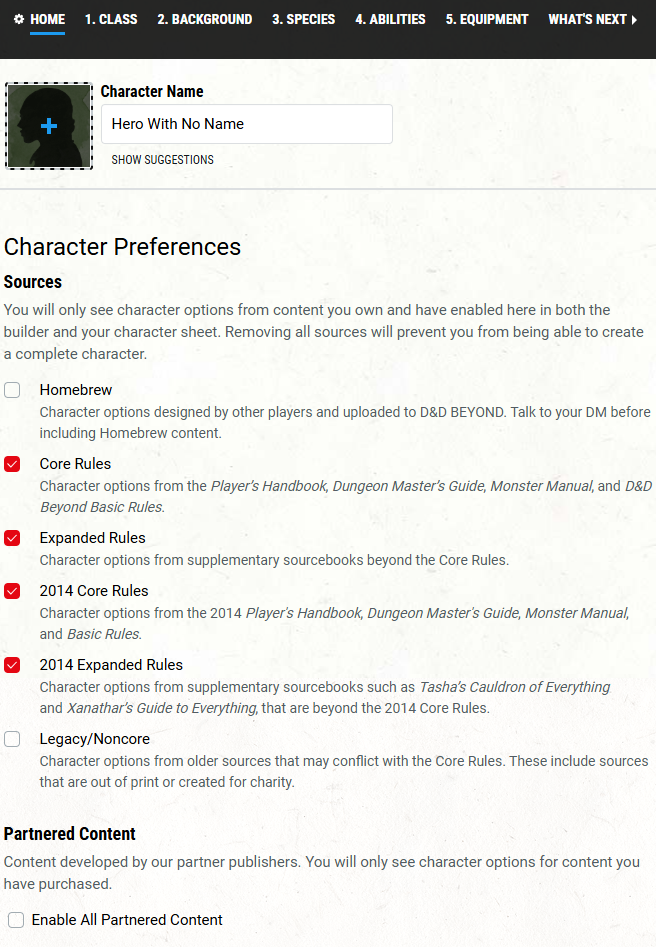
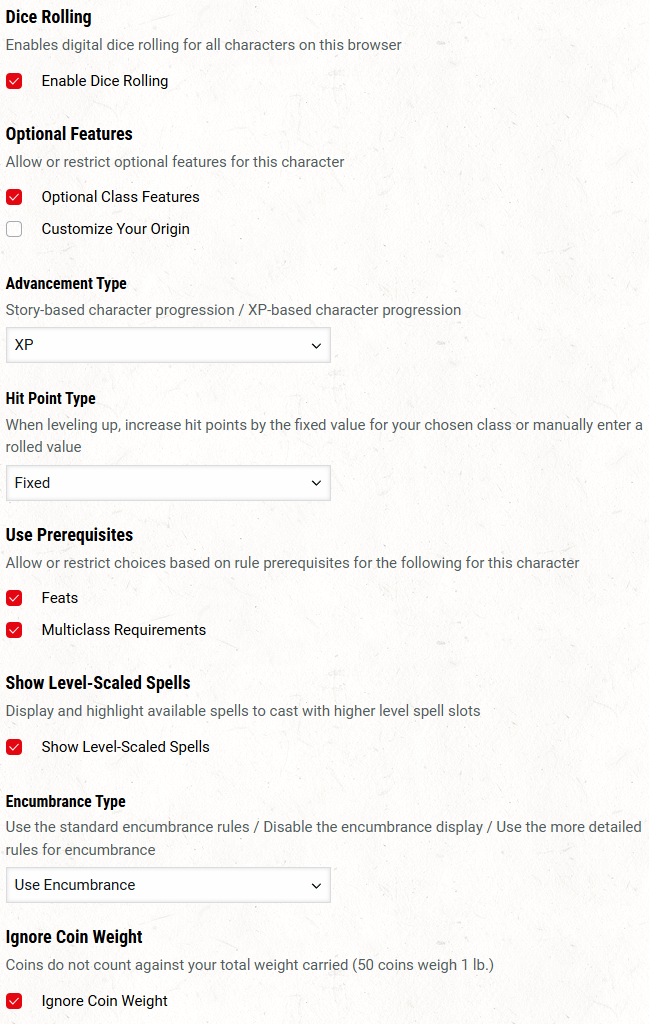
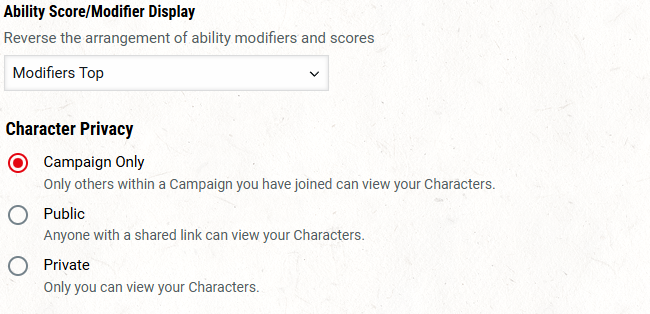 And with that, we're ready to get to the fun stuff!
Step Two: The Decisions
Class
The first (and most important) decision is your character's class. Navigate to the 1. Class tab in the character creator:
 As you can see, there are several to choose from in Dungeons and Dragons, and the basics of each can be found on this site or directly in the builder itself. This is the choice that will shape your gameplay the most.
It is advisable to select from the classes under the "Core Rules" section rather than the 2014 versions.
As you can see, there are several to choose from in Dungeons and Dragons, and the basics of each can be found on this site or directly in the builder itself. This is the choice that will shape your gameplay the most.
It is advisable to select from the classes under the "Core Rules" section rather than the 2014 versions.
After making your decision, click on it and add the class to your character. This will automatically bring you to your Class Features:
 Anything highlighted with an exclamation point (in the above case, Core Barbarian Traits and Weapon Mastery) requires your attention as there are further decisions to make. Get those taken care of (again, ask questions if unsure!) and move on to the next tab, 2. Background.
Background
The background decisions you make are not as mechanically meaningful as many others, but are arguably even more important--this is where we start creating the actual personality of the character. However, in the world of Eritora, and especially in Turnbuckle Town, your background is part of what determines your monthly stipend.
The first step is selecting your Background. The list is long. I suggest narrowing the scope to the ones under the Core Rules header to keep things simple:
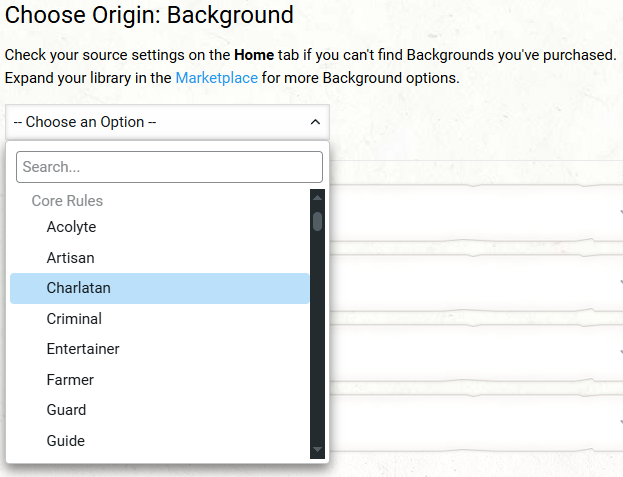 Upon selection, you will have more choices to make. So make those, as they are impactful--particularly the ability score improvements.
Below, we have several sections to help refine your character:
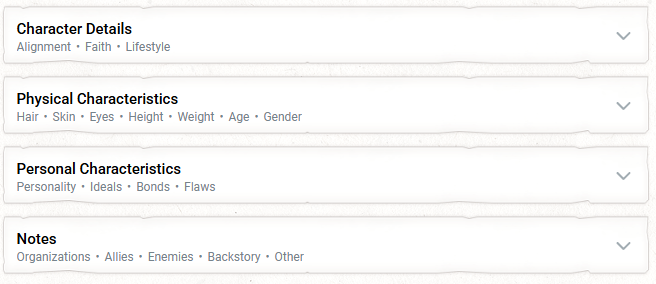 The most important section is Character Details. These decisions are necessary. Selecting an alignment will give you a basic idea of what each one means. Choose whichever speaks to you. We will generally be skewing towards the Good/Neutral departments, but if you want to be evil and piss people off, go hog wild!
More information on Faith can be found in the Religion section of the website. It is customary for folk in Eritora to worship a deity, but not strictly necessary.
Finally, lifestyle is an important choice, particularly if you plan on choosing the Client path later on, as it will be a factor in your monthly stipend. Line this up with whatever backstory you've got for your character. For example, it wouldn't make sense for a petty street thief to live an Aristocratic lifestyle. Or maybe it would! If your story supports it.
Details under the other tabs can be useful for you to flesh out your character, but are not strictly necessary. You can always come back to this later as you get a feel for your character.
When finished, navigate to the 3. Species tab.
Species
The next decision to make is your character's species. Although humans are the most common species, Eritora is a diverse place. Each species has its own set of bonuses and abilities, but these are not nearly as impactful as your class choice--feel free to choose whatever is most appealing to you or suits your character the best, and it will be just fine. As per usual, basic information on species can be found on the site and more detail can be found elsewhere. I'm going to quit typing that now, as it's always going to be true.
Under the Species tab are all of the different sorts of people available to you. As per usual, I recommend focusing on those found under the Core Rules tab to keep things simple. Selecting a species will pop up a list of details about that species. Once you've made your decision, click Confirm to bring up a few more smaller choices.
Afterwards, navigate to the 4. Abilities tab.
Ability Scores
Your Background and Species decisions, while impactful, are largely cosmetic. These, however, are big ones.
To get started, we're going to choose the "Standard Array" method of ability score generation for every character in the campaign:
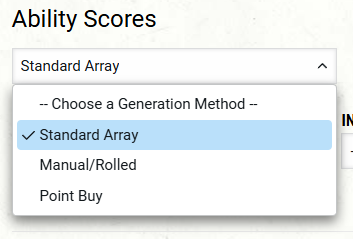 This provides you with a nice average spread of rolls for you. Simply select each number from the drop-downs below each ability score, and we're ready to roll:
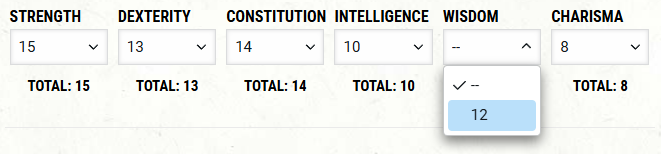 If this is your first character, it is advisable to contact someone about these, as these can make a big difference to your character's efficacy.
Time to move on to 5. Equipment.
Equipment
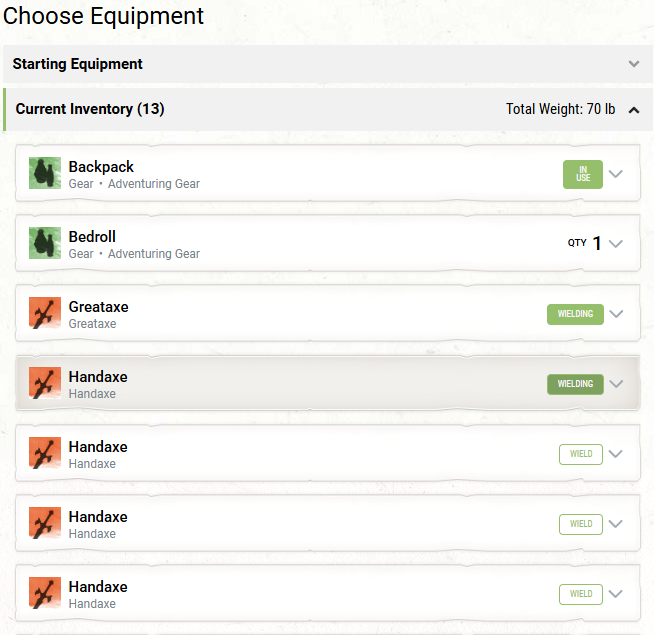
This one's easy. A checkbox for your class, and a checkbox for your background. Pick one of each, and click Add Starting Equipment.
You'll then want to click the boxes to wield your weapons and equip your armor:
Your Place in Turnbuckle Town
There is an important distinction between Clients and Guides in Turnbuckle Town's economy. Information on the two can be found at Guides and Clients. This is a decision specific to this campaign; there will be no information available elsewhere.
If you select Client, calculate your starting monthly stipend and give yourself a one-time payment of double that stipend to get started. Details found here: Character Earnings and Budgets.
If you select Guide, choose one uncommon magic item from those available to you on DnDBeyond to give to your character.
The End
And you've done it! You're ready to go! You can now access your fully character sheet on DnDBeyond or print out a pdf if you like using paper.